
Establish powers of attorney. Onboard clients.
Matters directly into Advocat.
Minutes
instead of hours from first contact to completed power of attorney
Zero
duplicate entries structured data directly into Advocat
All
types of powers of attorney, Litigation, representation, service, incorporation, data protection
Product
Stenzel uses UNOY as the UNOY Legal Engine.
UNOY Legal Engine is the product suite for controlled legal workflows with playbooks, approvals, and audit trail. At Stenzel, deployed via Co-Build, then self-maintained as a power-of-attorney tool with Advocat integration.
In Use
- Power-of-attorney tool (10 types)
- Structured client data
- Attorney approval before handover
- Direct import into Advocat
- Professional liability with the attorney
Model & Key Data
- Co-Build · self-maintained
- Advocat integration
- Solo to small firm
Background
Who is Wolfgang Stenzel?
Wolfgang Stenzel, LL.M., is an attorney in Graz with his practice at Tummelplatz in the heart of the city. He studied at the Vienna University of Economics and Business and passed the bar exam at the Vienna Court of Appeal in 2020 with distinction. He gained professional experience at renowned firms in Vienna and Graz before founding his own practice.
The practice areas are unusually broad and deliberately digital in orientation: startup and formation law, data protection and IT law, contract law and general terms, crypto and social media law, and family and inheritance law. What connects all areas: Stenzel advises clients who operate in a digital world and expects his own firm infrastructure to match the same pace and precision.
The Challenge
What used to be difficult.
Every matter begins with a power of attorney. That sounds simple, but it is not: depending on the area of law and the specific case, different types of powers of attorney are required: litigation, general representation, service of process, incorporation-specific, or data protection representation. Previously this meant: find the right template, fill it in manually, send it to the client, wait for the signature, then type everything into Advocat again.
Added to this was the information problem: before a power of attorney can be created, the firm needs structured client information. Name, address, date of birth, but also case-specific data such as legal form, counterparty name, or subject matter of the proceedings. This information arrived by email, by phone, sometimes on handwritten notes. Follow-up questions were the rule, not the exception.
And at the end stood the duplicate work: everything assembled manually and entered into the power of attorney had to be recorded a second time in Advocat: client master data, case data, document assignments. For a solo firm with a broad range of practice areas, this is not just a waste of time but a scaling problem: more matters mean proportionally more administrative effort.
Voice
The power-of-attorney tool has completely changed how we start a matter. What used to be email back-and-forth and paperwork is now a digital workflow, from the initial information through to the file in Advocat.
In Use · Co-Build
Stenzel Law
Solo firm · Professional liability & attorney-client privilege
UNOY OS
Platform · Co-Build configured
Clients
Data in · matter in Advocat
Stenzel carries the legal responsibility with his own professional liability. UNOY OS prepares every client request in structured form. The attorney reviews, approves, and sends. Three roles, one workflow, Co-Build for regulated legal work.
Application
How Stenzel uses UNOY.
Four steps. One power of attorney. One attorney signs off. Structured matter file directly in Advocat, with no duplicate entry.
Onboarding
Client captured in structured form.
01 · Onboarding
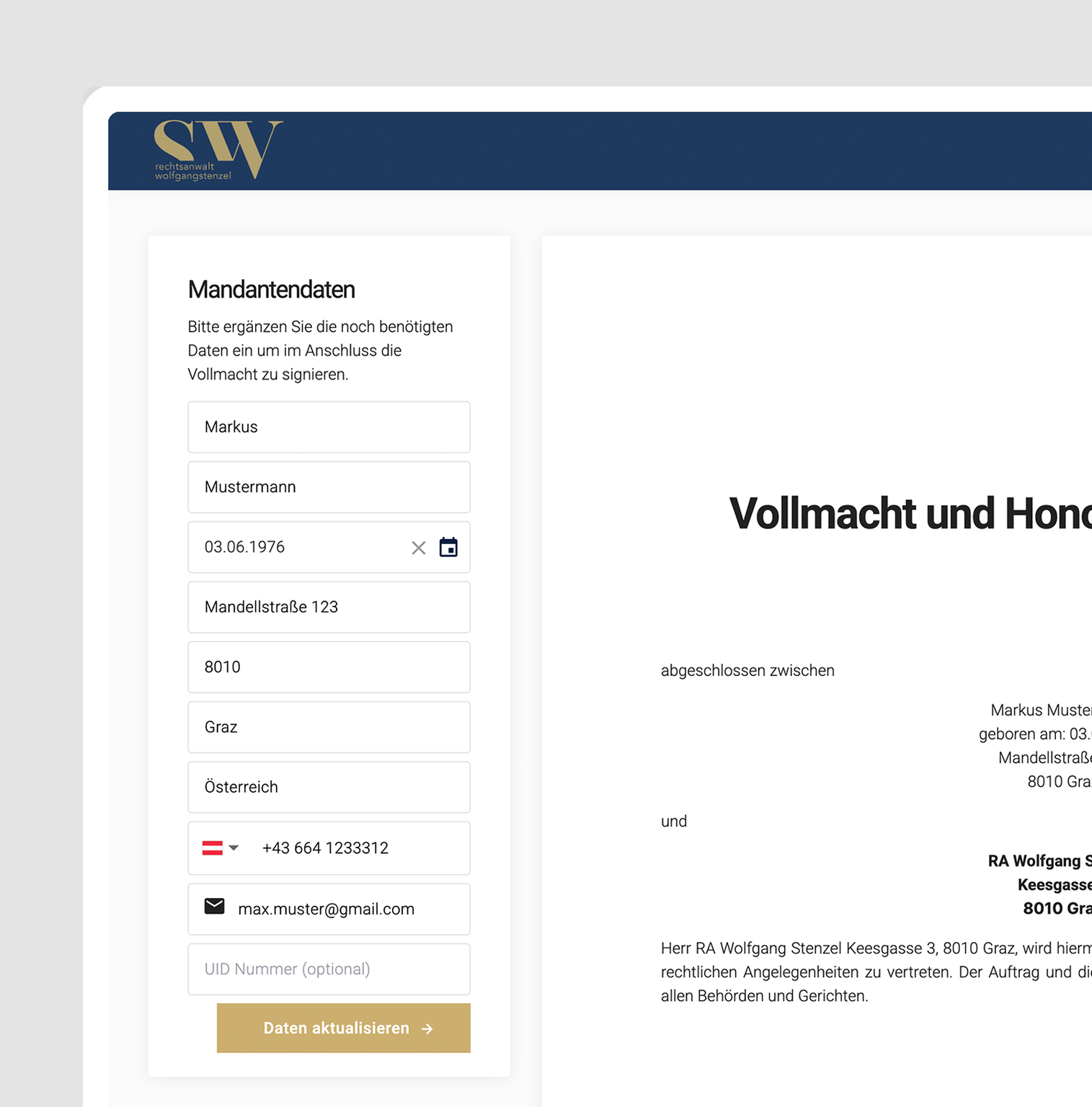
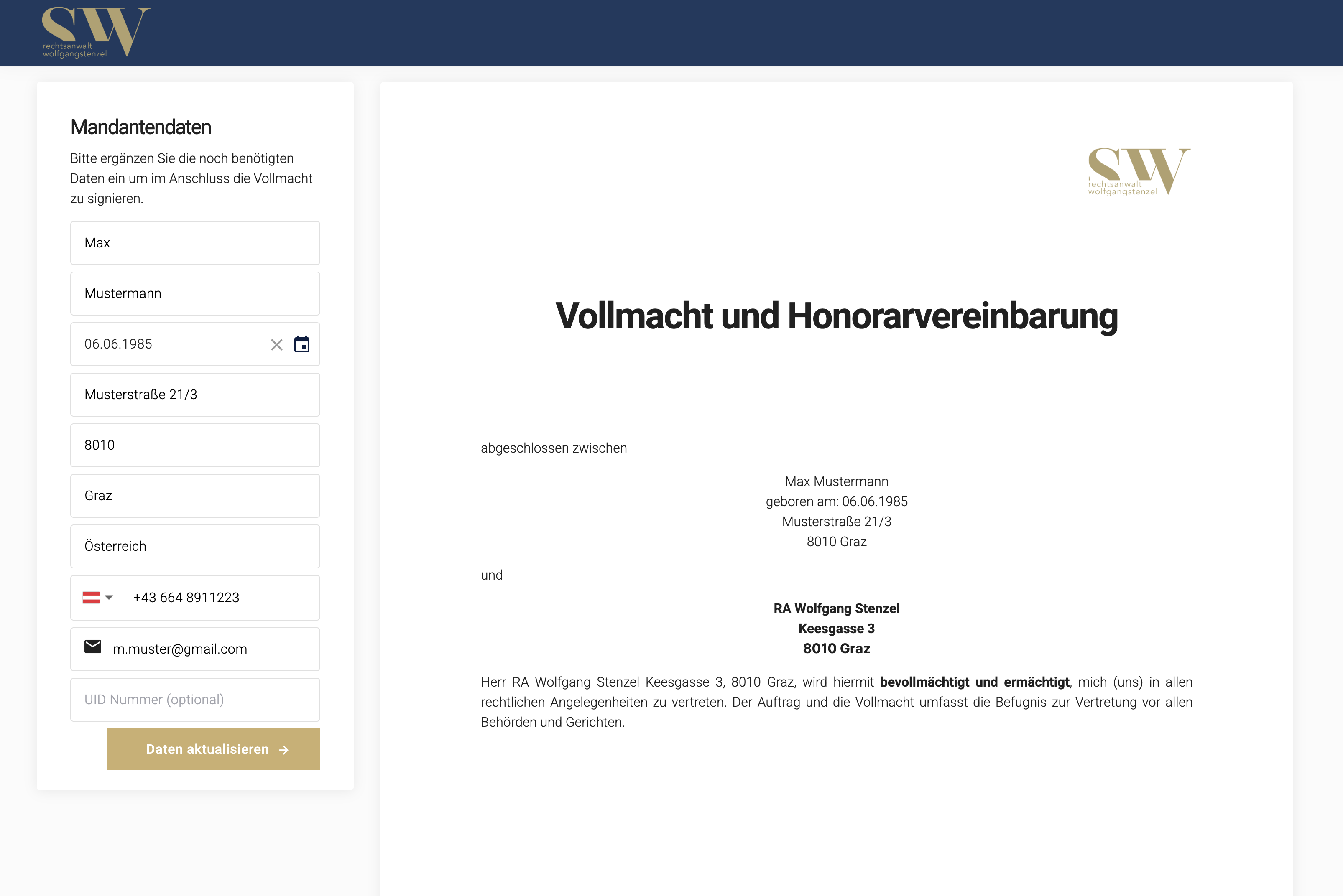
The client opens the onboarding form and enters master data, contact information, and case-specific details. The form is dynamic: depending on the selected area of law, the correct mandatory fields appear (legal form for incorporations, counterparty name for representation, subject matter for litigation).
Power of Attorney
Template-based generation.
02 · Power of Attorney
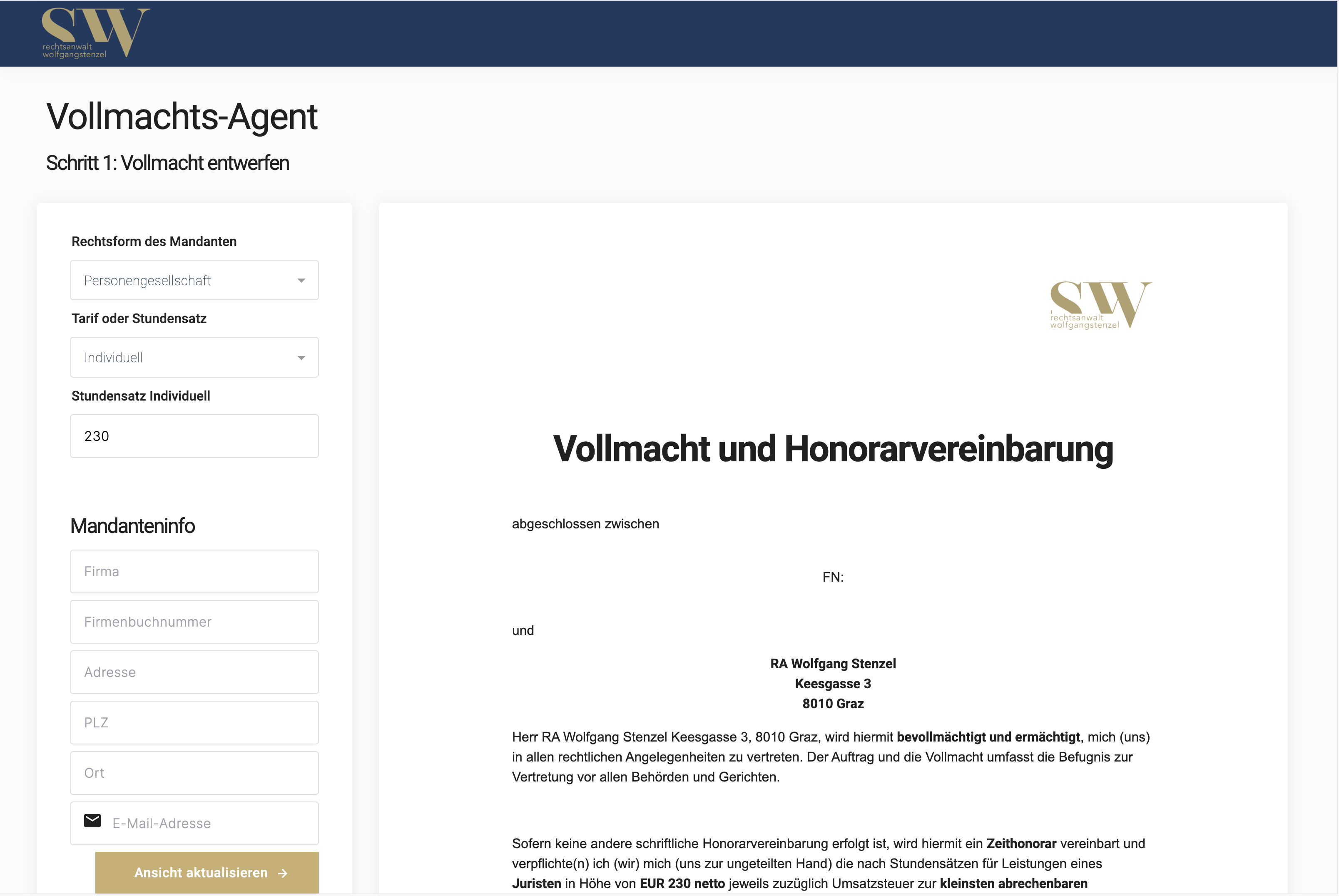
UNOY OS suggests the appropriate type of power of attorney based on the area of law and case specifics. The attorney confirms or switches manually. The template is populated with variable fields: client data, counterparty name, subject matter, and scope of authority.
Routing Logic
Standard power of attorney (litigation, representation, service): template generated · Edge case (incorporation, data protection representation, atypical situation): escalation to attorney with explanation · No match: stop, manual drafting required.
Signature
Client signs digitally.
03 · Signature
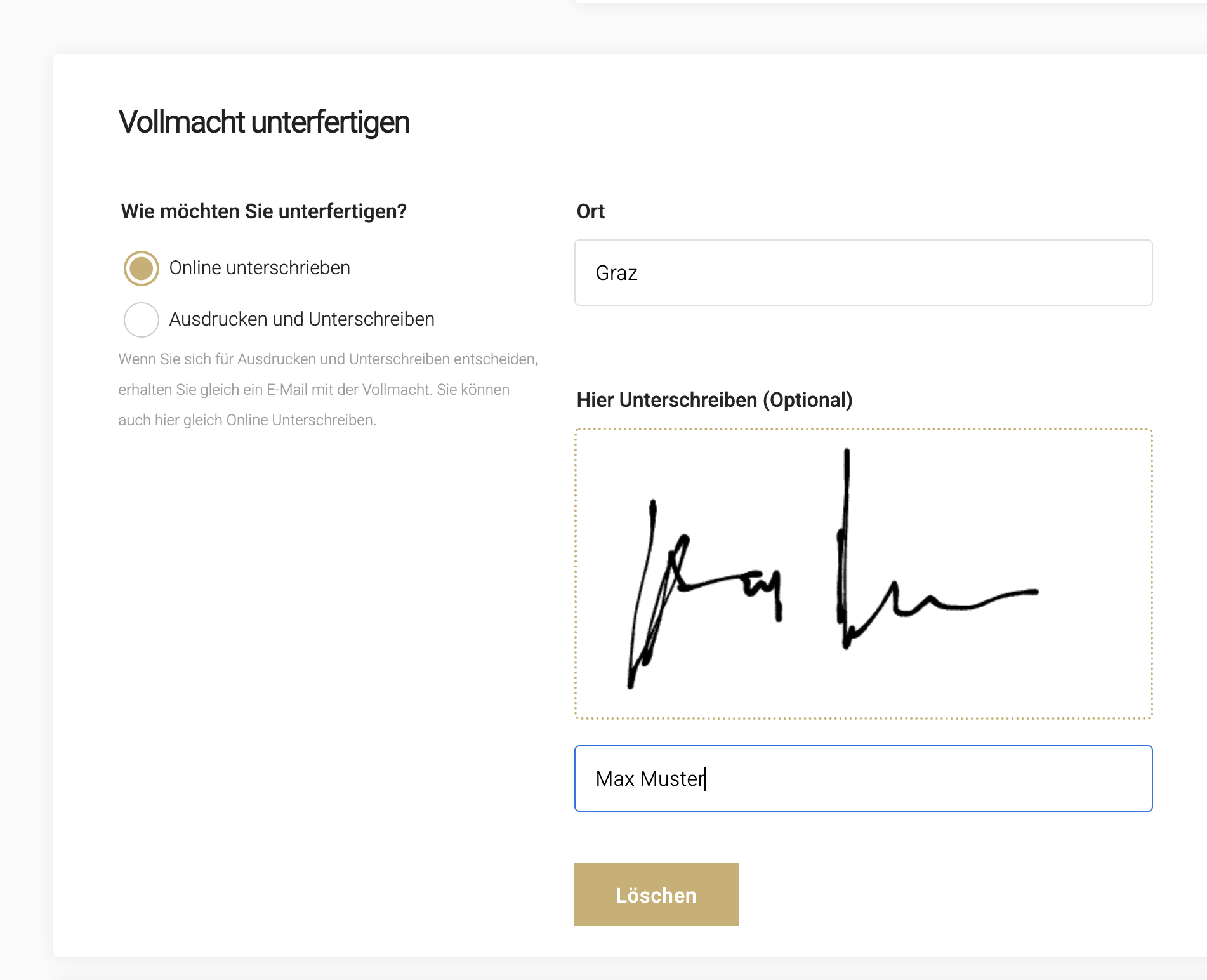
The client receives a link to sign digitally. The power of attorney is finalized in the same step. Relevant documents (ID, articles of association, evidence) can be uploaded immediately; UNOY OS assigns them to the file based on rules.
Advocat Import
Matter file created in Advocat.
04 · Advocat Import
After the attorney approval: all structured data, client master record, case data, power of attorney, documents, flow directly into Advocat. No duplicate entry, no manual transfer. The firm can begin substantive work from the moment of signature.
Findings
What we learned.
The power-of-attorney tool solves a problem every firm knows but few address systematically: starting a matter. Stenzel did not want a document management system or a legal AI tool. He wanted an internal workflow that maps exactly one process from beginning to end. Nothing more, nothing less.
The real gain lies in the chain. Client enters data → UNOY generates power of attorney → client signs digitally → UNOY creates the matter file in Advocat. Four steps that previously required four different systems and several days are now one continuous workflow.
A tool does not need to do everything; it needs to do one thing well. The power-of-attorney tool does no contract review, no deadline tracking, no billing. It does exactly one thing: the path from first contact to completed power of attorney with a matter file in Advocat. No feature bloat, no learning curve, no distraction.
Self-service template management is the scaling lever. Stenzel can create new types of powers of attorney and modify existing ones independently, without UNOY support. The legal logic stays within the firm.
FAQ
What you should know about this case.
Who is Wolfgang Stenzel?
Wolfgang Stenzel, LL.M., is an attorney in Graz with his practice at Tummelplatz. Focus areas: startup and formation law, data protection and IT law, contract law and general terms, crypto and social media law, and family and inheritance law.
Which UNOY model does Stenzel use?
Stenzel uses the UNOY Co-Build model: the power-of-attorney tool was set up together with UNOY, from the client request through to the Advocat import. Day-to-day operation rests with the firm itself; new types of powers of attorney are added via self-service.
Who bears the legal responsibility?
Stenzel Law bears the legal responsibility, with its own professional liability and attorney-client privilege. UNOY OS prepares the data in structured form; the attorney reviews, approves, and signs. UNOY OS does not replace any legal step.
How does the Advocat import work?
After attorney approval, all structured data is transferred directly to Advocat: client record, case data, power of attorney, documents. No duplicate entry, no manual transfer. From the moment of signature, the firm can begin substantive work.
Can Stenzel add new types of powers of attorney independently?
Yes. In the self-service area of the UNOY platform, Stenzel can create new types of powers of attorney, modify existing templates, and adjust required-field logic without UNOY support. The legal logic remains entirely within the firm.
What happens if UNOY ceases operations?
Upon contract termination, Stenzel receives all workflows, templates, validation rules, and audit logs as an export. The rule sets are documented as JSON logic, portable to another provider. The legal obligation to retain matter files remains with the firm. No lock-in.
§ 07 · Tech Stack
Technical Deep Dive: Power-of-Attorney Issuance & Advocat Import
Client Onboarding Form
Web-based form with master data, contact information, and case-specific details, dynamic depending on the selected area of law
Power-of-Attorney Type Selection
Litigation, general representation, service of process, incorporation, data protection representation, suggested by rules or selected manually
Rule-Based Power-of-Attorney Generation
Template-based creation with variable fields: client data, counterparty name, subject matter, scope of authority
Digital Signature
Integrated signing function: client receives link, signs digitally, power of attorney is finalized by rules (eIDAS-compliant)
Document Upload and Assignment
Client uploads relevant documents; rule-based assignment to the case and matter file
Approval Workflow
Attorney reviews and approves before data is transferred to Advocat; human-in-the-loop as quality assurance
Power-of-Attorney Template Management
Stenzel can create templates, modify them, and add new types of powers of attorney without UNOY support
Integration with Existing Systems
Advocat (matter import) · WinCause (claim value & litigation preparation) · DocuSign (eIDAS signature) · email system · audit storage.
Data Residency & GDPR
EU data centers in Frankfurt and Vienna · data processing agreement on request · client data stored encrypted and in compliance with attorney-client privilege.
AI Governance per ISO/IEC 42001
AI management system per ISO/IEC 42001. Matter inventory, risk assessment per workflow, approval stamp per matter, quarterly review.
Audit Trail
Complete traceability: when each piece of information was entered, when signed, when imported into Advocat; exportable for audits and professional conduct reviews.
Product Category
This story belongs to UNOY Legal Back Office.
UNOY Back Office is the product category for recurring workflows built and operated in the back office: workflow engine, template library, integration with existing systems, audit trail. Stenzel, Puttinger Vogl, and Esterer use UNOY in the legal back-office variant. UNOY does not replace the attorney; it replaces the effort between client and attorney: client intake, powers of attorney, contract templates, deadline tracking, matter handover to Advocat/WinCause.
In Stenzel's case: a single, clearly bounded workflow (the power-of-attorney tool), built for the firm's own use, operated during ongoing matter work, integrated into Advocat. Self/Co-Build model without external IT dependency.
Other firms using UNOY Legal Back Office

Puttinger Vogl
Intelligent intake: client requests structured, classified, and handed over to Advocat.

Esterer & Ellmauthaler
Travel law workflow for mass matters, Advocat integration, attorney approval before filing.

Meyer Parkett
Same platform, non-legal context: 15+ workflows self-built in a 135-year family business.
Other Customers
More customer cases.
Esterer & Ellmauthaler
Onboard clients, prepare contracts, identify urgent cases, with Advocat import.

SKW Schwarz
Review engagement letters and draft cease-and-desist notices, 120+ attorneys.

PwC Austria
QA & compliance as a workflow, 1,450+ employees.
Bring us a real matter.
In 45 minutes we assess your matter, at no cost and without obligation. Self, Co-Build, or Delivery, whichever fits.